
3 Ways to Do Accounting in ProDBX
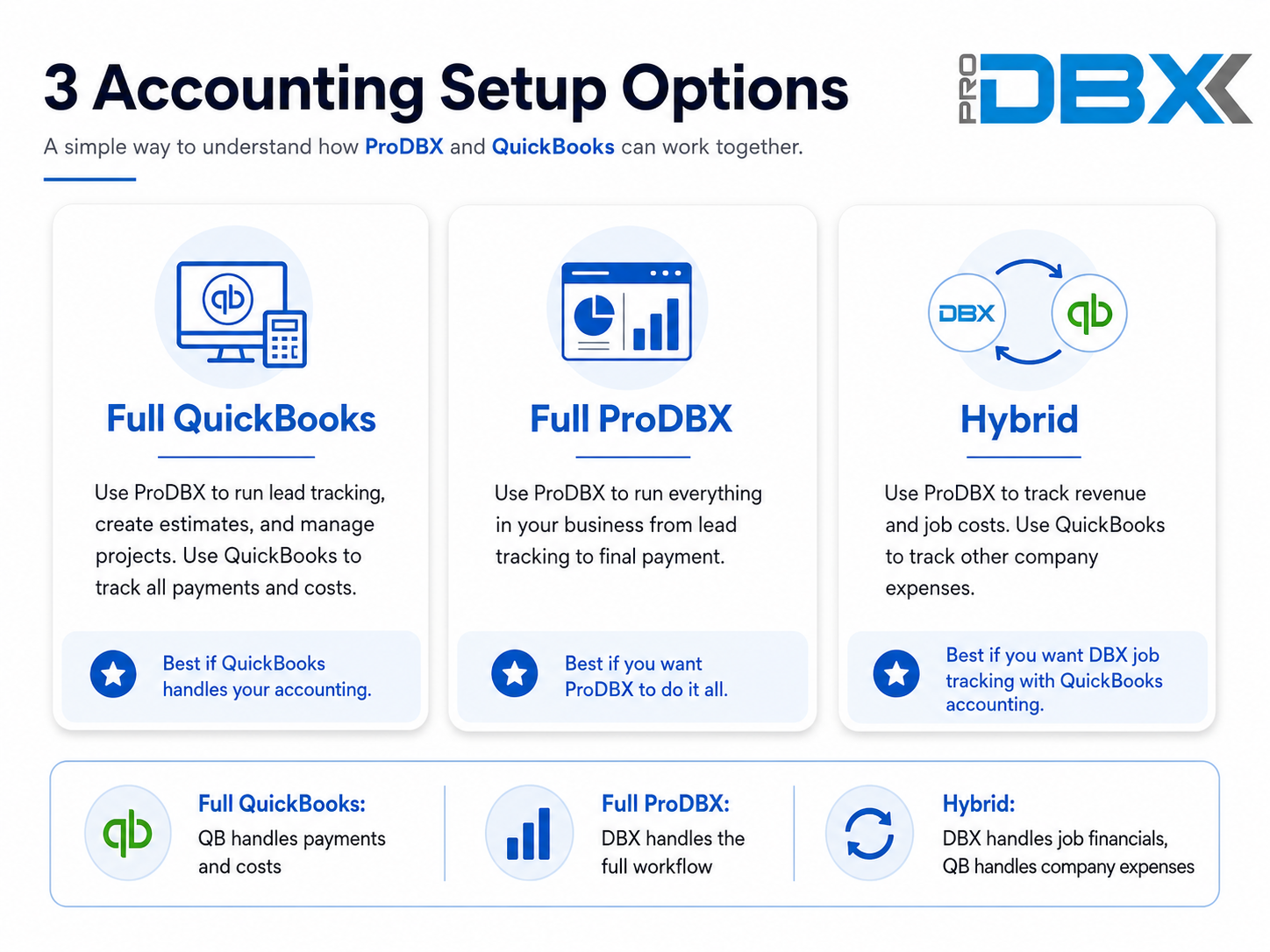
The ProDBX QuickBooks integrations gives you 3 ways to flexibly run the financials for your business.
- Use ProDBX to run lead tracking, create estimates, and manage projects. Use QuickBooks to track all payments and costs.
Full ProDBX
- Use ProDBX to run everything in your business from lead tracking to final payment.
Hybrid
- Use ProDBX to track revenue and job costs. Use QuickBooks to track other company expenses.
ProDBX and QuickBooks FAQ
Learn how ProDBX and QuickBooks can work together and compare the Full QuickBooks, Full ProDBX Accounting, and Hybrid accounting options.
What information does the QuickBooks Integration sync?
After an estimate is approved by the customer in ProDBX, the QuickBooks Integration can create a basic customer record in QuickBooks along with basic invoices for the initial deposit, addendum payments, and progress payments.
The integration does not transfer the complete ProDBX customer or job record. Detailed estimates, project information, schedules, documents, job costs, and other project-management information remain in ProDBX.
Is the ProDBX and QuickBooks Integration two-way?
No. The integration is one-way from ProDBX to QuickBooks. Information entered or changed in QuickBooks does not automatically update ProDBX.
If an invoice is changed in ProDBX after it has already been created in QuickBooks, the corresponding change must also be completed manually in QuickBooks.
When does ProDBX create the customer and invoices in QuickBooks?
The customer and related invoices can be created in QuickBooks after the estimate has been approved by the customer in ProDBX. ProDBX can then send the basic customer information and applicable deposit, addendum, and progress-payment invoices to QuickBooks.
Should I create customers in QuickBooks before syncing them from ProDBX?
No. Customers should be created in ProDBX first and then sent to QuickBooks through the integration. Creating the same customer separately in both systems can result in duplicate QuickBooks customer records.
Does QuickBooks receive the complete customer and job record from ProDBX?
No. QuickBooks receives only the basic customer information and basic invoices needed for accounting. ProDBX remains the primary system for lead information, estimates, customer approvals, project schedules, documents, job details, and project management.
Do changes to a ProDBX invoice automatically update QuickBooks?
No. After an invoice has been created in QuickBooks, later changes made to that invoice in ProDBX do not automatically update the QuickBooks invoice. The corresponding changes must be entered manually in QuickBooks.
Does the QuickBooks Integration sync customer payments?
No. The integration creates basic customer records and basic invoices in QuickBooks, but it does not provide a two-way payment sync.
With the Full QuickBooks setup, payments are processed and tracked in QuickBooks. Payment information needed in ProDBX must be entered manually.
Is the QuickBooks Integration required?
No. The integration is optional and is primarily intended for companies using the Full QuickBooks accounting setup.
Companies using Full ProDBX Accounting or the Hybrid setup generally do not need to replicate individual customers and invoices in QuickBooks.
What accounting setup options are available with ProDBX?
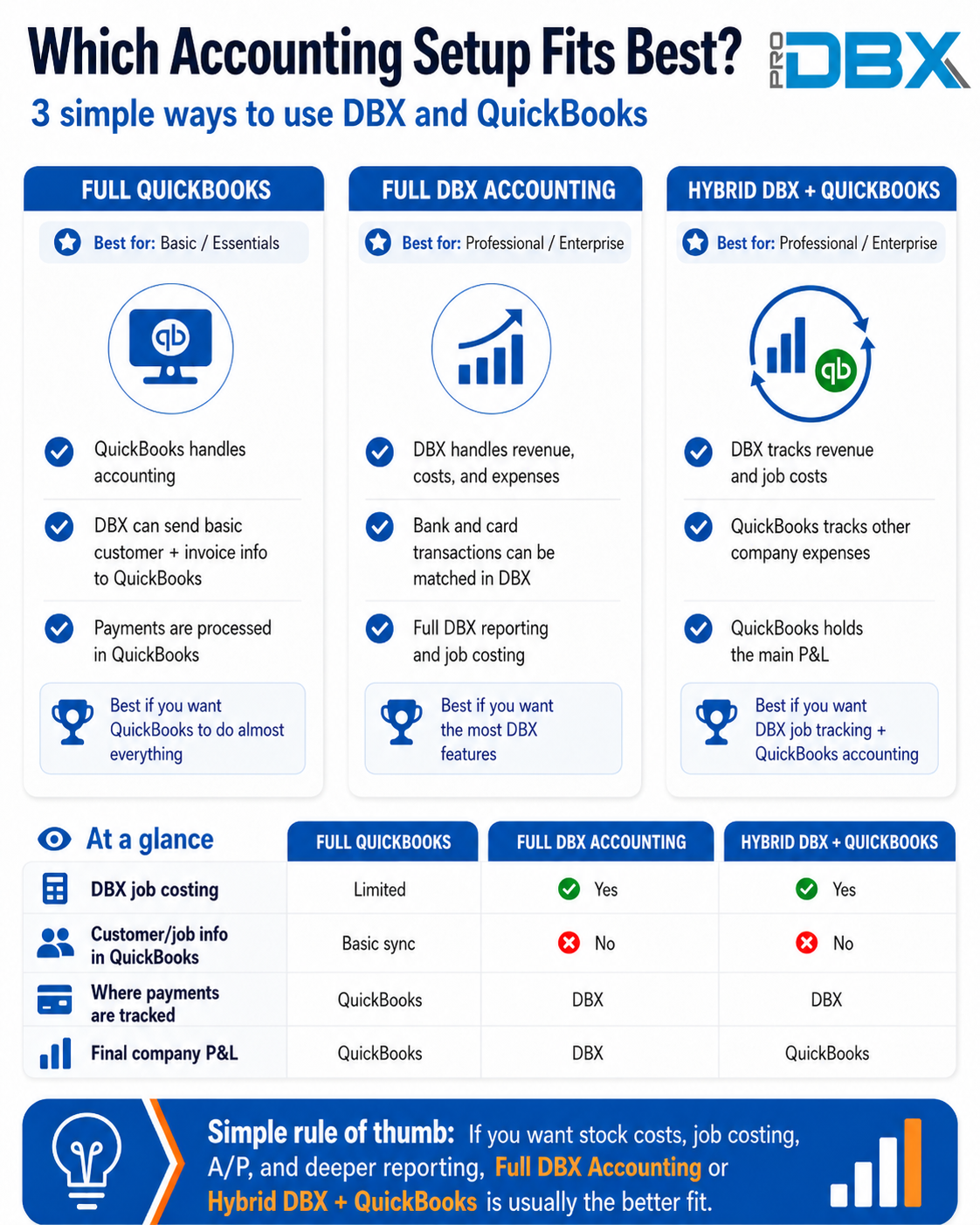
There are three primary options: Full QuickBooks, Full ProDBX Accounting, and a Hybrid ProDBX plus QuickBooks setup. The right option depends on where you want to track customer payments, job costs, company expenses, and your final company profit and loss statement.
How does the Full QuickBooks option work?
With Full QuickBooks, ProDBX is used for lead tracking, estimating, customer approvals, and project management. QuickBooks is used to track customer payments, revenue, cost of goods sold, company expenses, and the final company profit and loss statement.
Who is the Full QuickBooks option best for?
Full QuickBooks is generally best for companies using the Basic or Essentials ProDBX packages that want QuickBooks to remain their primary accounting system.
It can also work for companies that do not need complete ProDBX stock costing, accounts payable, job costing, timecards, payroll, or advanced budget reporting.
How does Full ProDBX Accounting work?
With Full ProDBX Accounting, ProDBX manages the complete business workflow from lead tracking and estimating through project management, job costing, expenses, customer payments, and final accounting reports.
Revenue, cost of goods sold, and company expenses are all tracked in ProDBX.
Who is Full ProDBX Accounting best for?
Full ProDBX Accounting is generally best for Professional and Enterprise customers that want to use ProDBX stock costs, purchase orders, work orders, accounts payable, job budgets, job costing, timecards, payroll, and detailed financial reporting.
How does the Hybrid ProDBX and QuickBooks option work?
With the Hybrid option, ProDBX tracks customer revenue, job costs, and cost of goods sold. QuickBooks tracks the company's other operating expenses and remains the location of the final company profit and loss statement.
How is ProDBX financial information entered into QuickBooks with the Hybrid option?
A summarized journal entry is created in QuickBooks for total job revenue and cost of goods sold. This is normally completed once per month, although it can be completed more frequently if desired.
Individual ProDBX customers, jobs, and invoices do not need to be recreated in QuickBooks.
Where are customer payments processed and recorded?
With the Full QuickBooks setup, customer payments are processed and tracked in QuickBooks and may require manual entry into ProDBX.
With Full ProDBX Accounting or the Hybrid setup, companies can use ProDBX payment processing or manually enter job-payment transactions into ProDBX.
Which options support ProDBX job costing and budget reports?
Full ProDBX Accounting and the Hybrid setup support ProDBX stock costs, purchase and work-order costs, job budgets, work-in-progress reporting, accounts payable, and job costing.
These features are limited or require manual cost entry when using the Full QuickBooks setup.
Can I use ProDBX purchase orders and work orders with Full QuickBooks?
Yes. Purchase orders and work orders can still be created in ProDBX. However, they will normally include customer prices without complete cost information unless costs are manually entered into ProDBX.
Missing cost information limits related budget, job-costing, and profitability reports.
Where is the final company profit and loss statement located?
With Full QuickBooks, the final company profit and loss statement is in QuickBooks. With Full ProDBX Accounting, it is in ProDBX.
With the Hybrid option, QuickBooks holds the final company profit and loss statement using the company expenses recorded in QuickBooks and summarized revenue and cost of goods sold from ProDBX.
Which accounting setup should my company choose?
Choose Full QuickBooks if you want QuickBooks to handle nearly all accounting activity.
Choose Full ProDBX Accounting if you want ProDBX to manage the full workflow from lead tracking through final payment and accounting.
Choose Hybrid if you want ProDBX to provide detailed job-level financial tracking while QuickBooks tracks other company expenses and produces the final company profit and loss statement.