

Stress-free Scheduling
ProDBX’s enhanced Project Management automates your entire work-flow for even the most advanced projects. This app will provide you with a stress free method to manage all your projects based off accurate estimates to your clients. Easily track project progress in real time and automate the entire fulfillment process.
Here’s how it works:
- Send jobs to Project Management
- Assign work to Users or Sub Contractors
- Schedule work
- Employees and Sub Contractors are automatically notified
- Manage job progress in the dashboard
ProDBX is a scheduler’s best friend!
Flexible Project Management and Scheduling Views
See Scheduled Jobs by Day

Managing multiple projects can get overwhelming—but ProDBX makes it simple. Our Day View Calendar gives you a clear, intuitive way to see exactly what’s happening across all your jobs.
On the left side, you’ll see a monthly calendar at a glance, with each day showing the number of scheduled phases. This makes it easy to spot busy days, plan resources, and make adjustments before conflicts arise.
On the right side, the day view dives into the details. You’ll see a list of scheduled phases, associated job numbers, and key information for each task. Whether you need to know which crew is assigned, the specific work phase, or the job location, everything is visible in one place—no hunting through spreadsheets or emails.
With ProDBX, scheduling isn’t just about marking dates—it’s about seeing your entire operation in one unified view so you can make smarter decisions, keep projects on track, and stay ahead of deadlines.
See Jobs by Construction Phase
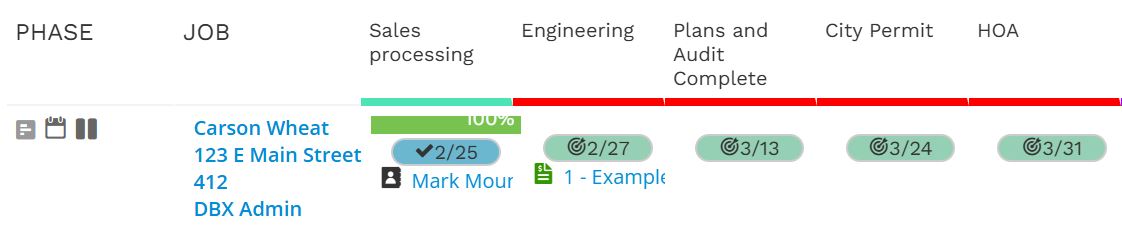
Keeping track of multiple jobs and their individual phases can get complicated—but ProDBX makes it effortless with Phase View, your virtual whiteboard for project management.
At a glance, you can see all your phases laid out left to right across the top, in the order they occur. On the left-most column, the customer and job information stays fixed, giving you a clear anchor as you navigate through your workflow.
Phase View makes it easy to:
-
Track progress: See completion rates for each phase at a glance.
-
Stay on schedule: View both scheduled and estimated dates for every phase.
-
Manage assignments: Quickly see which team members are responsible for each phase.
-
Drill down: Focus on a single job for detailed insights or zoom out to see all jobs together.
With ProDBX Phase View, your projects are no longer a tangle of spreadsheets and sticky notes. Instead, you get a dynamic, visual representation of every phase—helping you stay organized, optimize workflows, and make smarter decisions, all in real time.
Simple Job Drill Down View

ProDBX’s Job Drill Down offers a clear, text-based view of any job, putting all the important information in one spot. See every phase, assignment, scheduled date, and completion status without navigating through multiple screens or calendars.
This simplified view is perfect for managers or team members who need quick access to the details. With everything on a single screen, you can monitor progress, check assignments, and ensure nothing slips through the cracks—making job management faster, easier, and more organized.
Fulfill
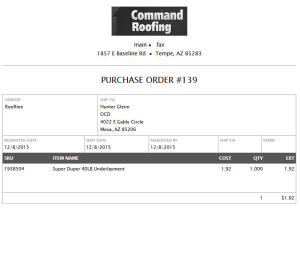
After using the ProDBX Estimating Tool to easily create fully customized and detailed proposals for your customers, all corresponding purchase and work orders are then created automatically.
- Update commissions, quantities, and expected due dates for work orders at anytime
- Automatically trigger progress payments to be due based on work completion
Assign
Each work order can be assigned individually to your vendors or users, or assigned automatically by setting up default assignments.
- Once a work order is assigned, users are notified immediately via text or email
- Easily update progress and work completion
- Create work specific tasks or notes for others
- Attach photos using a phone or tablet
Manage
Using the ProDBX Project Management Dashboard, you can easily view, track, and update all of your open jobs at a glance.
- View each phase’s progress individually
- Reassign and update work orders in one place
- Customize dashboards to fit your individual company’s needs, including color coding phases, adding custom fields and other helpful information
Pay
As work orders are completed, all commissions flow directly into the ProDBX Payroll App. Simply select the users and jobs to pay on, adjust any amounts if necessary, and submit.
- Commissions can be split between members of a crew, using set dollar amounts or percentages.
- Auto-calculate workers compensation where necessary, and send employee wages to your payroll company.
- All commissions, payroll, and payroll overhead are recorded in ProDBX – providing you with true a true job cost down to the penny.
Project Management Dashboard
Easily manage the entire scope and all of your projects at a glance using the ProDBX Project Management Dashboard.
Track in Real-Time:
- Customize your dashboard to include any pertinent information or custom fields regarding your customers, along with their orders or jobs.
- View each phase and open work order’s progress, assigned user, and status.
- Assign colors to each step to easy identify and track progress.
ProDBX Project Management is the most advanced and complete solution for your business.
Fulfillment Automation
Pricing
Cost
Purchase Orders
Work Orders
Next app: Task Management

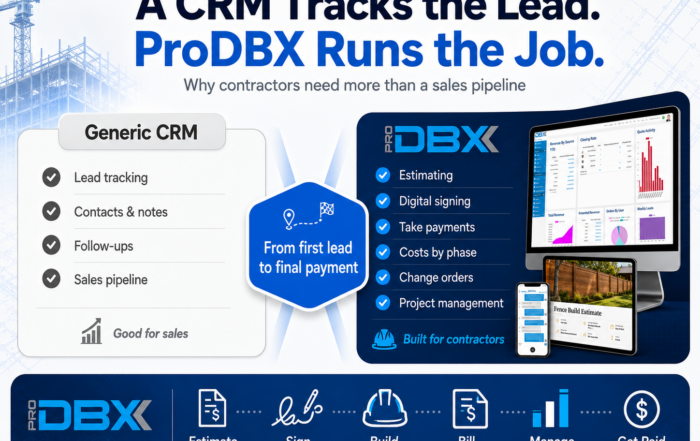
ProDBX vs Generic CRM
Still not convinced that ProDBX is right for you? Read about how to improve the customer experience with ProDBX

How Better Organization Helps Pool Builders Earn More Customer Trust
Still not convinced that ProDBX is right for you? Read about the 5 Signs Your Pools Leads are Falling Through the Cracks